
时间:2024-11-05 15:36
人气:
作者:admin
利用射线检测实现光束照射激活功能——2024TapTap聚光灯GameJam
项目主题:Light
项目名称:《OneLastLight》(2D平台跳跃解密)
我的职责:gamepaly程序,负责实现游戏玩法功能
简述:
策划的设计为角色控制灯光,灯光照射到平台,可以使平台显现实体,玩家可以借助平台解密。
灯光可以被不是平台的实体阻挡,而且灯光不能被平台阻挡,可以穿透平台。
角色有两种形态的灯光,光圈会以玩家为中心形成圆形照亮区域,光束会从玩家开始射出一个扇形区域跟随鼠标探测。
光束有红、蓝、白三种颜色,光圈有红、蓝两种颜色。白色可以使所有平台显现实体,红、蓝光只能令相反颜色的平台显现实体,可以使相同颜色的平台隐藏。
这里记录我实现这个玩法所使用的解决办法。
采用射线检测方法,从角色的位置开始,每次让射线移动一个角度,设置角度限制,使射线检测形成扇形区域,而光圈模式只要将角度限制改为360度
普通的 Physics2D.Raycast只能检测射线碰到的第一个实体,不可穿透,所以这次选择Physics2D.RaycastAll方法,此方法可以返回一个射线上的所有实体从近到远的数组.(Physics2D-RaycastAll - Unity 脚本 API
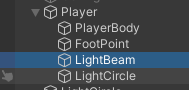
创建角色Player,创建两个空物体LightBeam、LightCircle作为Player的子物体
新建两个脚本:LightBeamController、LightCircleController,分别挂载在:LightBeam、和LightCircle上,脚本内容为构想中RayCastAll方法的实现使用,先获取射线上的所有物体,然后遍历,调用物体上脚本中的激活代码
LightBeamController(LightCircleControl相似):
//此方法用于实现光线激活平台、阻挡、穿透
void DrawFieldOfView(){
    // 计算最左侧方向的向量
    // -transform.up看情况设置,最好与LightBeam的旋转一致
    Vector3 forward_down = Quaternion.Euler(0, 0, -(viewAngle / 2f)) * -transform.up * viewRadius;

	//在限制角度内创建viewAngleStep条射线,每条射线偏移一定的角度
    for (int i = 0; i <= viewAngleStep; i++){
        Vector3 v = Quaternion.Euler(0, 0, (viewAngle / viewAngleStep) * i + 180f) * forward_down; // 根据当前角度计算方向向量
        Vector3 pos = transform.position + v; // 计算射线终点

        // 在Scene中绘制线条(仅在Scene中可见,方便查看)
        Debug.DrawLine(transform.position, pos, Color.red);

        // 设置射线检测射线
        Ray2D ray = new Ray2D(transform.position, v);

		//射线检测
        RaycastHit2D[] hits =
            Physics2D.RaycastAll(ray.origin, v, viewRadius, LayerMask.GetMask("Trigger")); //这里设置只检测Trigger层级

		//遍历检测到的物体
        for (int j = 0; j < hits.Length; j++){
            RaycastHit2D hitInfo = hits[j];
            if (hitInfo.collider != null){
                if (hitInfo.collider.CompareTag("BluePlatform") || hitInfo.collider.CompareTag("RedPlatform")){
                    //检测到为BluePlatform或者RedPlatform执行平台上的显现操作
                    }
                }
            }
        }
    }
}
if (hitInfo.collider.CompareTag("BluePlatform") || hitInfo.collider.CompareTag("RedPlatform")){
                    //检测到为BluePlatform或者RedPlatform执行平台上的显现操作
                    }
                    else break;
                }


public void BoxDisappear()
    {
        _entity.SetActive(false);
    }
public void BoxAppear()
    {
        _entity.SetActive(true);
        timer=0;//将计时器置为0
    }
private void Update()
{

    timer += Time.deltaTime;
    if (timer > canSeeTime)
    {
	      BoxDisappear();
    }
if (hitInfo.collider.CompareTag("BluePlatform")||
	hitInfo.collider.CompareTag("RedPlatform")){
        switch (_colorID){
            case 0:
                if (hitInfo.collider.CompareTag("BluePlatform"))
                    hitInfo.collider.gameObject.GetComponent<PlatFormController>().BoxAppear();
                if (hitInfo.collider.CompareTag("RedPlatform"))
                    hitInfo.collider.gameObject.GetComponent<PlatFormController>().BoxDisAppear();
                break;
            case 1:
                if (hitInfo.collider.CompareTag("BluePlatform"))
                    hitInfo.collider.gameObject.GetComponent<PlatFormController>().BoxDisAppear();
                if (hitInfo.collider.CompareTag("RedPlatform"))
                    hitInfo.collider.gameObject.GetComponent<PlatFormController>().BoxAppear();
                break;
            case 2:
                if (hitInfo.collider.CompareTag("BluePlatform"))
                    hitInfo.collider.gameObject.GetComponent<PlatFormController>().BoxAppear();
                if (hitInfo.collider.CompareTag("RedPlatform"))
                    hitInfo.collider.gameObject.GetComponent<PlatFormController>().BoxAppear();
                break;
	    }
    }
    else break;
}
将射线检测的方法放在UpDate中调用,完成!
光束与光圈模式的切换只需启用对应对象。
光束跟随鼠标,只需要令游戏对象LightBeam跟随鼠标旋转即可。
项目整体视频演示
项目代码GitHub链接(由于项目后面要配合Shader实现视觉效果,源码可能与上文略有差别)
下一篇:有限状态机(FSM)的使用

 关注微信
关注微信