
时间:2025-03-27 11:03
人气:
作者:admin
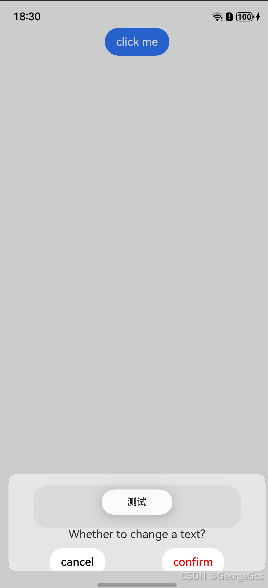
弹框和气泡,dialog和toast。是我们应用开发中常用的两种提示媒介。
在鸿蒙应用中,如果自定义弹框在底部展示时,又弹出气泡进行提示,会发现气泡在弹框层级之下。会被遮挡住,影响气泡的显示。
设置气泡的显示模式为置顶即可:
       promptAction.showToast({
            message: "测试",
            duration: 3000,
            showMode: promptAction.ToastShowMode.TOP_MOST, // 添加展示模式,顶部展示,可保证层级最高。
          })
下方源码,操作点击click me按钮,显示弹框的同时,会显示气泡:
@Entry
@Component
struct TextPage {
  @State textValue: string = ''
  @State inputValue: string = 'click me'
  dialogController: CustomDialogController | null = new CustomDialogController({
    builder: CustomDialogExample({
      cancel: ()=> { this.onCancel() },
      confirm: ()=> { this.onAccept() },
      textValue: $textValue,
      inputValue: $inputValue
    }),
    cancel: this.exitApp,
    autoCancel: true,
    onWillDismiss:(dismissDialogAction: DismissDialogAction)=> {
      console.info("reason=" + JSON.stringify(dismissDialogAction.reason))
      console.log("dialog onWillDismiss")
      if (dismissDialogAction.reason == DismissReason.PRESS_BACK) {
        dismissDialogAction.dismiss()
      }
      if (dismissDialogAction.reason == DismissReason.TOUCH_OUTSIDE) {
        dismissDialogAction.dismiss()
      }
    },
    keyboardAvoidMode: KeyboardAvoidMode.DEFAULT,
    alignment: DialogAlignment.Bottom,
    // offset: { dx: 0, dy: -20 },
    gridCount: 4,
    customStyle: false,
    cornerRadius: 10,
    backgroundColor: Color.Black
  })

  // 在自定义组件即将析构销毁时将dialogController置空
  aboutToDisappear() {
    this.dialogController = null // 将dialogController置空
  }

  onCancel() {
    console.info('Callback when the first button is clicked')
  }

  onAccept() {
    console.info('Callback when the second button is clicked')
  }

  exitApp() {
    console.info('Click the callback in the blank area')
  }
  build() {
    Column() {
      Button(this.inputValue)
        .onClick(() => {
          promptAction.showToast({
            message: "测试",
            duration: 3000,
            showMode: promptAction.ToastShowMode.TOP_MOST, // 添加展示模式,顶部展示,可保证层级最高。
          })
          if (this.dialogController != null) {
            this.dialogController.open()
          }
        }).backgroundColor(0x317aff)
    }.width('100%').margin({ top: 5 })
    .margin({
      bottom: -16
    })
  }
}


@CustomDialog
@Component
struct CustomDialogExample {
  @Link textValue: string
  @Link inputValue: string

  controller?: CustomDialogController
  cancel: () => void = () => {
  }
  confirm: () => void = () => {
  }

  build() {
    Column() {
      TextInput({ placeholder: '', text: this.textValue }).height(60).width('90%')
        .onChange((value: string) => {
          this.textValue = value
        })
      Text('Whether to change a text?').fontSize(16).margin({ bottom: 10 })
      Flex({ justifyContent: FlexAlign.SpaceAround }) {
        Button('cancel')
          .onClick(() => {
            if (this.controller != undefined) {
              this.controller.close()
              this.cancel()
            }
          }).backgroundColor(0xffffff).fontColor(Color.Black)
        Button('confirm')
          .onClick(() => {
            if (this.controller != undefined) {
              this.inputValue = this.textValue
              this.controller.close()
              this.confirm()
            }
          }).backgroundColor(0xffffff).fontColor(Color.Red)
      }.margin({ bottom: 10 })

    }.width("90%")
    .offset({ x: 0, y: 16})
  }
}






 关注微信
关注微信