
时间:2025-10-27 10:56
人气:
作者:admin

CSV 因其简洁和跨平台的广泛支持,是最常见的表格数据交换格式之一。然而,当需要处理结构化应用程序、配置文件或层次化数据时,XML 通常成为首选格式,因为它能够表示嵌套关系并提供更严格的数据验证。
在本指南中,我们将探讨如何使用 Spire.XLS for Python 将 CSV 文件转换为 XML。你将学习如何将 CSV 转换为 Excel XML 格式以及 标准 XML 。同时,我们还将介绍如何清理和预处理真实世界中的 CSV 文件——处理无效表头、缺失值、特殊字符和嵌套字段等问题,以确保生成的 XML 输出始终有效且结构正确。
Spire.XLS for Python试用下载,请联系慧都科技
欢迎加入Spire技术交流Q群(125237868),与更多小伙伴一起提升文档开发技能~
为什么开发者需要将 CSV 转 XML 呢?以下是一些实际应用场景:
CSV 以简洁取胜,XML 以结构见长。通过两者的互相转换,你可以兼得两种格式的优势。
在开始编写代码之前,请确保准备好以下环境:
通过 pip 安装 Spire.XLS(假设系统中已安装 Python 和 pip):
pip install spire.xls此外,请准备一个测试用 CSV 文件,例如:
员工ID,姓名,部门,职位,入职日期,薪资
1001,张三,技术部,软件工程师,2021-03-15,15000
1002,李四,市场部,市场专员,2022-07-01,12000
1003,王五,技术部,产品经理,2020-11-10,18000
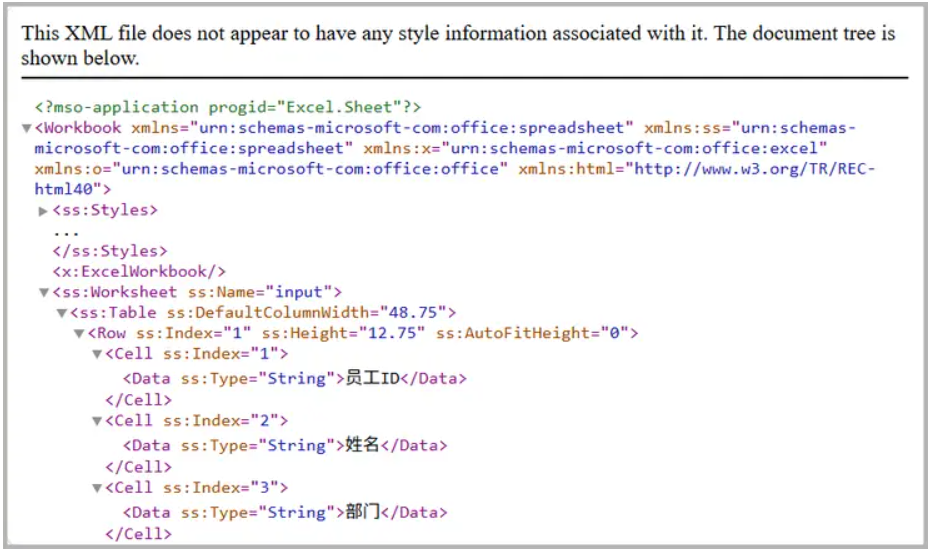
1004,赵六,人力资源部,招聘经理,2019-05-22,14000第一种方法是将 CSV 转换为 Excel 兼容的 XML 格式,也称为 SpreadsheetML (Excel 2003 引入)。这种格式可以被 Excel 直接打开。
使用 Spire.XLS,这一过程非常简单:
from spire.xls import *

# 创建 Workbook
workbook = Workbook()

# 加载 CSV 文件
workbook.LoadFromFile("input.csv", ",", 1, 1)

# 保存为 Excel XML格式
workbook.SaveAsXml("output.xml")

# 释放资源
workbook.Dispose()
工作原理
效果图 :
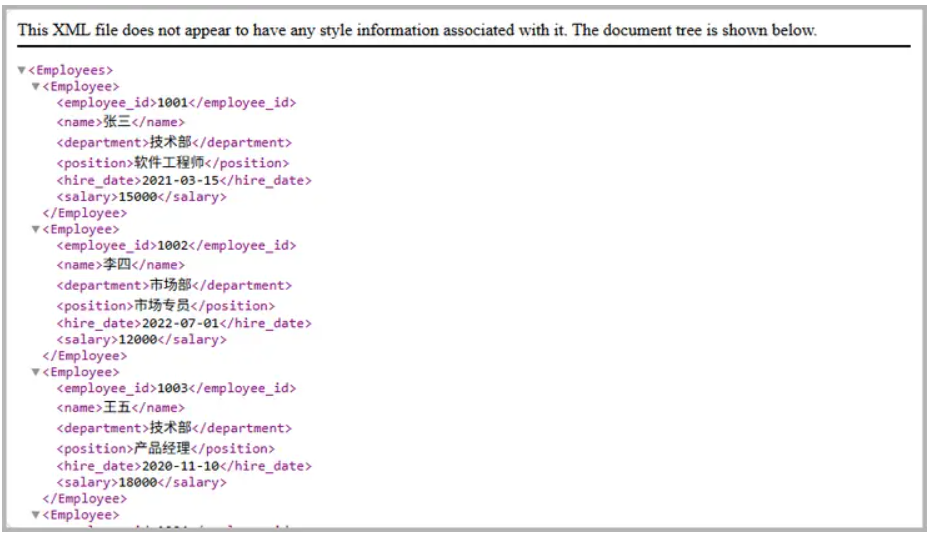
更多时候,你可能需要如下所示标准的XML 结构,而不是 Excel 兼容格式:
<Employee>
  <employee_id>1001</employee_id>
  <name>张三</name>
  <department>技术部</department>
  <position>软件工程师</position>
  <hire_date>2021-03-15</hire_date>
  <salary>15000</salary>
</Employee>
实现方式如下:
from spire.xls import *
import xml.etree.ElementTree as ET
from xml.dom import minidom

def chinese_to_english_tag(chinese_header):
    """
    将特定的中文列名转换为英文XML标签
    """
    mapping = {
        '员工ID': 'employee_id',
        '姓名': 'name',
        '部门': 'department',
        '职位': 'position',
        '入职日期': 'hire_date',
        '薪资': 'salary'
    }
    # 去除前后空格后查找映射
    cleaned_header = chinese_header.strip()
    return mapping.get(cleaned_header, cleaned_header)

# Step 1: 加载 CSV 文件
workbook = Workbook()
workbook.LoadFromFile(r"C:\Users\Administrator\Desktop\input.csv", ",", 1, 1)
sheet = workbook.Worksheets[0]

# Step 2: 创建根节点
root = ET.Element("Employees")

# Step 3: 处理表头 - 中文列名转英文
headers = []
for col in range(1, sheet.Columns.Count + 1):
    cell_value = sheet.Range[1, col].Value
    if not cell_value:
        break
    english_tag = chinese_to_english_tag(str(cell_value))
    headers.append(english_tag)

# Step 4: 添加数据行
for row in range(2, sheet.Rows.Count + 1):
    if not sheet.Range[row, 1].Value:
        break
    employee = ET.SubElement(root, "Employee")
    for col, english_header in enumerate(headers, start=1):
        cell_value = sheet.Range[row, col].Value
        field = ET.SubElement(employee, english_header)
        field.text = str(cell_value) if cell_value is not None else ""

# Step 5: 保存为格式化的 XML 文件
xml_str = ET.tostring(root, encoding='utf-8')
pretty_xml = minidom.parseString(xml_str).toprettyxml(indent="  ")

with open("output/standard.xml", 'w', encoding='utf-8') as f:
    f.write(pretty_xml)

# 释放资源
workbook.Dispose()
工作原理
效果图 :
将“完美”的 CSV 转换为 XML 很容易,但实际 CSV 往往并不理想。以下是常见问题及对应解决方案:
OrderID,Customer,Products
1001,张三,"电脑;鼠标;键盘"
若直接转换,将丢失层次结构。
<Products>
  <Product>电脑</Product>
  <Product>鼠标</Product>
  <Product>键盘</Product>
</Products>
中文列名转换为英文
可使用以下辅助函数自动预处理 CSV (不包含中文列名转换为英文):
import csv
import re

def clean_csv(input_file, output_file, nested_columns=None, nested_delimiter=";"):
    if nested_columns is None:
        nested_columns = []

    cleaned_rows = []

    # 转义 XML 特殊字符
    def escape_xml(text):
        return (text.replace("&", "&")
                    .replace("<", "<")
                    .replace(">", ">")
                    .replace('"', """)
                    .replace("'", "'"))

    with open(input_file, "r", encoding="utf-8") as infile:
        reader = csv.reader(infile)
        headers = next(reader)

        # 清理表头
        cleaned_headers = []
        for h in headers:
            h = h.strip()                              # 去除首尾空格
            h = re.sub(r"\s+", "_", h)                 # 将空格替换为下划线
            h = re.sub(r"[^a-zA-Z0-9_]", "", h)        # 移除非法字符
            if re.match(r"^\d", h):                    # 若表头以数字开头,则加前缀
                h = "Field_" + h
            cleaned_headers.append(h)

        cleaned_rows.append(cleaned_headers)

        # 读取所有行数据
        raw_rows = []
        for row in reader:
            # 将空单元格替换为 "NULL"
            row = [cell if cell.strip() != "" else "NULL" for cell in row]
            raw_rows.append(row)

    # 处理嵌套列(如多值列)
    if nested_columns:
        expanded_rows = [cleaned_headers]  # 保留表头
        for row in raw_rows:
            row_variants = [row]
            for col_name in nested_columns:
                if col_name not in cleaned_headers:
                    continue
                col_index = cleaned_headers.index(col_name)
                temp = []
                for variant in row_variants:
                    cell_value = variant[col_index]
                    # 仅按嵌套分隔符拆分,不影响 XML 特殊字符
                    if nested_delimiter in cell_value:
                        items = [item.strip() for item in cell_value.split(nested_delimiter)]
                        for item in items:
                            new_variant = variant.copy()
                            new_variant[col_index] = item
                            temp.append(new_variant)
                    else:
                        temp.append(variant)
                row_variants = temp
            expanded_rows.extend(row_variants)
        cleaned_rows = expanded_rows
    else:
        cleaned_rows.extend(raw_rows)

    # 展开后再转义特殊字符
    final_rows = [cleaned_rows[0]]  # 保留表头
    for row in cleaned_rows[1:]:
        final_row = [escape_xml(cell) for cell in row]
        final_rows.append(final_row)

    # 写入清理后的 CSV 文件
    with open(output_file, "w", newline="", encoding="utf-8") as outfile:
        writer = csv.writer(outfile)
        writer.writerows(final_rows)

print(f"清理后的 CSV 已保存至 {output_file}")
你可以通过传入输入和输出 CSV 文件路径来调用 clean_csv 函数,并可选地指定需要展开嵌套值的列。
# 文件路径
input_file = r"C:\Users\Administrator\Desktop\input.csv"
output_file = r"C:\Users\Administrator\Desktop\cleaned_output.csv"

# 指定可能包含嵌套值的列
nested_columns = ["Products"]  # 你也可以添加更多,例如 ["Products", "Reviews"]

# 调用 clean_csv 函数
clean_csv(input_file, output_file, nested_columns=nested_columns, nested_delimiter=";")
该函数可确保 CSV 在转换为 XML 前干净、有效,功能包括:
使用 Spire.XLS for Python 将 CSV 转换为 XML,不仅高效,而且具备极强的灵活性。无论是快速导出、结构化集成,还是复杂的业务数据转换,都能轻松应对。
从企业系统集成、报表归档,到旧系统的数据迁移,这一流程充分结合了 CSV 的简洁性 与 XML 的结构化优势 ,为数据交换与自动化处理提供了稳健、高可维护的解决方案。
可以,但建议采用流式处理(逐行处理)以避免内存问题。
支持。保存为 Excel XML 是内置功能,但自定义 XML 仍需代码实现。
可使用 escape_xml 辅助函数或 Python 内置的 xml.sax.saxutils.escape()。
调用 clean_csv 时,可在 nested_columns 参数中传入多个列名。
可以。生成 XML 后,可根据 XSD 模式进行验证。
Spire.XLS for Python试用下载,请联系慧都科技
欢迎加入Spire技术交流Q群(125237868),与更多小伙伴一起提升文档开发技能~
下一篇:独立开发AI产品的那些事


 关注微信
关注微信