
时间:2025-09-26 10:46
人气:
作者:admin
在职场生活中,创建和共享活动日程表是一项例行公事。为了提高效率,您需要自动为 Outlook 创建ICS文件。要实现这种自动化,您可以依赖Aspose.Email for Python via .NET。这款 Outlook SDK 是一款快速、安全且开发人员友好的自动日历安排解决方案。此外,它还允许您以编程方式创建会议/活动,这些会议/活动可以在几乎所有流行的电子邮件客户端(例如Microsoft Outlook、Google 日历或Apple 日历)中打开。在本指南中,我们将演示如何借助Aspose.Email使用 Python 创建事件日历。
Aspose.Email 正版试用下载,请联系Aspose官方授权代理商慧都科技
加入Aspose技术交流QQ群(1041253375),与更多小伙伴一起探讨提升开发技能。
安装此 SDK 非常简单。您联系Aspose官方授权代理商慧都科技下载SDK 文件,或在终端/CMD 中运行以下 pip 命令:
pip install Aspose.Email-for-Python-via-NET 本节将向您展示开发 ICS 文件创建器的实现。
请按照以下步骤操作:
这是用 Python 创建事件日历的代码片段:
import aspose.email as ae
from aspose.email import MailAddress, MailAddressCollection
from aspose.email.calendar import (
    CalendarWriter,
    AppointmentIcsSaveOptions,
    AppointmentAction,
    Appointment
)
import datetime as dt

# Set the directory where the ICS file will be saved.
dataDir = "files"
# Apply Aspose.Email license
license = ae.License()
license.set_license("License.lic")
# Create an instance of the AppointmentIcsSaveOptions class to configure options to create new calendar events.
saveOptions = AppointmentIcsSaveOptions()
saveOptions.action = AppointmentAction.CREATE
# Create a CalendarWriter to write appointments to an ICS file.
writer = CalendarWriter(dataDir + "WriteMultipleEventsToICS_out.ics", saveOptions)
# Instantiate an object of the MailAddressCollection class to create a collection of attendees (you can add more if needed).
attendees = MailAddressCollection()
attendees.append(MailAddress("attendee@domain.com"))
# Loop to create and write 10 calendar appointments.
for i in range(10):
    # Create a new appointment by initializing an instance of the Appointment class.
    appointment = Appointment(
        location="Room 112",
        start_date=dt.datetime(2018, 5, 27, 22, 12, 11),  # Start date & time
        end_date=dt.date(2018, 5, 28),                    # End date
        organizer=MailAddress("from@domain.com"),
        attendees=attendees
    )
    # Set the appointment description (body).
    appointment.description = f"""\
    This is a test meeting body for appointment number {i}.
    Please review the following details:

    - Location: Room 112
    - Start Time: May 27, 2018 22:12
    - End Date: May 28, 2018
    - Organizer: from@domain.com
    - Attendee: attendee@domain.com

    Let us know if you have any questions.

    Regards,
    Test Scheduler Bot"""
    # Set the appointment summary (title/subject).
    appointment.summary = f"Test summary: Meeting {i}"
    # Call the write method to write the appointment to the ICS file.
    writer.write(appointment)
输出:
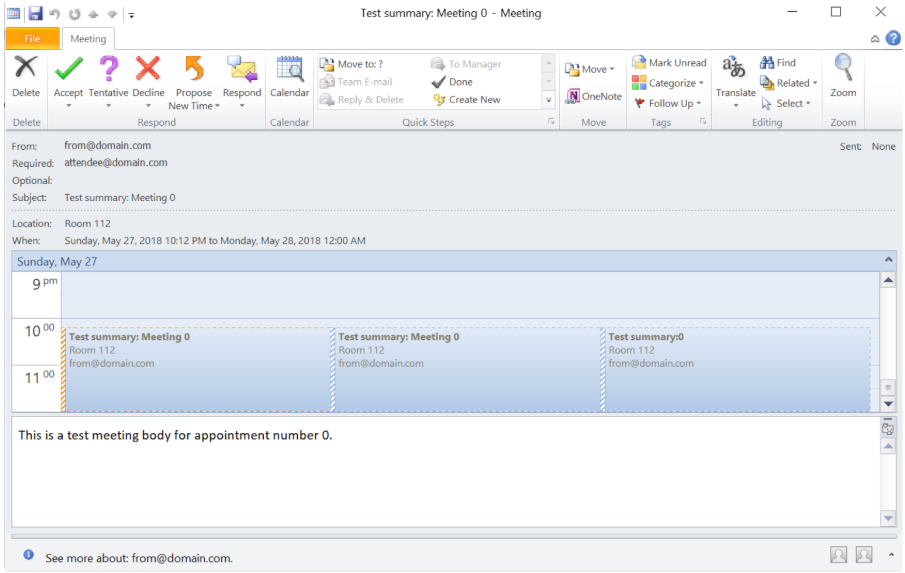
总之,Outlook 日历自动化如今已不再是一项艰巨的任务。Aspose.Email for Python 通过 .NET 为日历自动化带来了卓越的效率和稳健性。此 Outlook SDK 可让您无缝创建多个日历条目。
问:如何在 Python 中创建事件日历?
答:您可以通过 .NET 使用 Aspose.Email for Python在 Python 中创建事件日历。只需创建Appointment对象,设置其详细信息(日期、时间、参与者),然后使用CalendarWriter保存即可。
问:什么是日历约会?
答:日历约会是指安排好的事件,其中包含日期、时间、地点和参与者等详细信息。它有助于组织会议或活动,并可在 Outlook 或 Google 日历等数字日历之间共享。
Aspose.Email 正版试用下载,请联系Aspose官方授权代理商慧都科技
加入Aspose技术交流QQ群(1041253375),与更多小伙伴一起探讨提升开发技能。
上一篇:Manim实现涟漪扩散特效
下一篇:Manim实现气泡特效



 关注微信
关注微信